
Última versión
Versión
13.8
13.8
Actualizar
abril 24, 2026
abril 24, 2026
Revelador
Peace Among Us
Peace Among Us
Categorías
Medios de comunicación
Medios de comunicación
Plataformas
Android
Android
Descargas
0
0
Licencia
$0.99
$0.99
Nombre del paquete
com.pau.liqglass
com.pau.liqglass
Reportar
Informar de un problema
Informar de un problema
Más información sobre True Liquid Glass
True Liquid Glass: The Ultimate Interactive Wallpaper
Elevate your Android experience with a sophisticated, fluid aesthetic. True Liquid Glass combines the elegance of Material 3 with high-performance Liquid and Frosted glass effects, creating a dynamic sense of depth that responds to every touch and movement.
Note: For the most seamless experience, please allow the app to operate without battery restrictions when prompted.
🚀 Getting Started
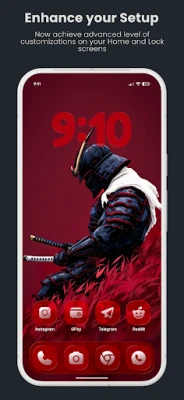
Initial Setup: Grant the necessary permissions and set the wallpaper. Ensure you select "Home and Lock Screen" to unlock the full potential of the engine.
Interactive Editing: To begin customizing, go to the Setup tab, apply the wallpaper and then enable "Edit Layout on Homescreen." This launches the Live Editor directly on your wallpaper.
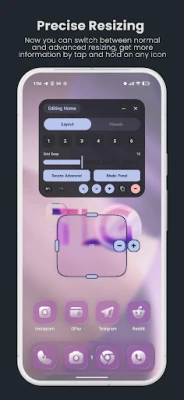
Pro Tip: Within the editor, tap and hold any icon for detailed information on its function.
🎛️ The Advanced Live Editor
Take total control of your layout without ever leaving your home screen.
-Seamless Switching: Toggle between Home and Lock screen configurations with a single tap; the panel title always clarifies which layout you are perfecting.
-Precision Movement: Select shapes by tapping them directly or using the scrollable selector. Long-press to drag and reposition.
-Dynamic Resizing: Use the intuitive drag handles or open the advanced resize menu for pixel-perfect adjustments.
-Smart Visibility: Set shapes to be visible or hidden independently for each screen.
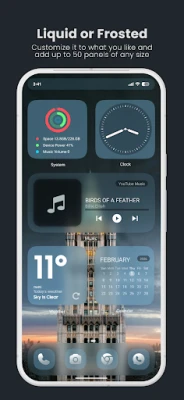
-Panel vs. Icon: Transform any shape into a sleek app-style icon or a broad glass panel.
-Workflow Tools: Includes Grid Snapping for alignment, and Undo/Redo history.
🎨 Limitless Customization
-Real-Time Preview: Every adjustment made in the app is reflected instantly in the live preview window and on the Homescreen.
-Versatile Sources: Support for single images, entire folders for rotation, or high-quality video backgrounds.
-Intelligent Rotation: Cycle through folder content manually by swiping the preview, or set a timer to change wallpapers automatically upon every unlock.
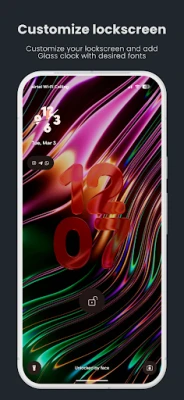
-Bespoke Clock Widget: A built-in glass clock that supports custom .ttf/.otf font uploads, 12/24h formats, and independent color overrides and Depth effect.
-Layout Presets: Effortlessly export, import, or share your custom configurations via JSON files.
✨ Premium Engine Features
-2D and 3D Depth Parallax: An accelerometer-driven effect that tilts the glass and background as you move your device.
-AI-Powered Occlusion: Place your clock behind foreground elements using an on-device depth estimation model for a true 3D look.
-Optical Physics: Authentic glass rendering featuring refraction, dispersion, and dynamic rim lighting.
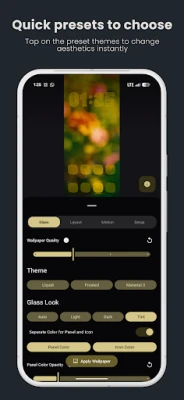
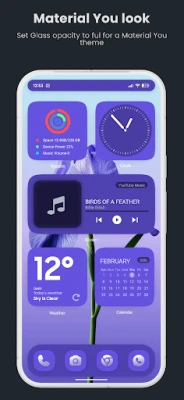
-Adaptive Tinting: Choose between Light, Dark, or Auto modes that sync with your system, or define a Custom palette with independent opacity for icons and panels.
-One-Tap Themes: Quickly jump between "Liquid," "Frosted," or "Material 3" presets to find your perfect style instantly.
Disclaimer: Standard Android widgets are not included but are designed to look beautiful when placed on top of our glass panels.
Note: For the most seamless experience, please allow the app to operate without battery restrictions when prompted.
🚀 Getting Started
Initial Setup: Grant the necessary permissions and set the wallpaper. Ensure you select "Home and Lock Screen" to unlock the full potential of the engine.
Interactive Editing: To begin customizing, go to the Setup tab, apply the wallpaper and then enable "Edit Layout on Homescreen." This launches the Live Editor directly on your wallpaper.
Pro Tip: Within the editor, tap and hold any icon for detailed information on its function.
🎛️ The Advanced Live Editor
Take total control of your layout without ever leaving your home screen.
-Seamless Switching: Toggle between Home and Lock screen configurations with a single tap; the panel title always clarifies which layout you are perfecting.
-Precision Movement: Select shapes by tapping them directly or using the scrollable selector. Long-press to drag and reposition.
-Dynamic Resizing: Use the intuitive drag handles or open the advanced resize menu for pixel-perfect adjustments.
-Smart Visibility: Set shapes to be visible or hidden independently for each screen.
-Panel vs. Icon: Transform any shape into a sleek app-style icon or a broad glass panel.
-Workflow Tools: Includes Grid Snapping for alignment, and Undo/Redo history.
🎨 Limitless Customization
-Real-Time Preview: Every adjustment made in the app is reflected instantly in the live preview window and on the Homescreen.
-Versatile Sources: Support for single images, entire folders for rotation, or high-quality video backgrounds.
-Intelligent Rotation: Cycle through folder content manually by swiping the preview, or set a timer to change wallpapers automatically upon every unlock.
-Bespoke Clock Widget: A built-in glass clock that supports custom .ttf/.otf font uploads, 12/24h formats, and independent color overrides and Depth effect.
-Layout Presets: Effortlessly export, import, or share your custom configurations via JSON files.
✨ Premium Engine Features
-2D and 3D Depth Parallax: An accelerometer-driven effect that tilts the glass and background as you move your device.
-AI-Powered Occlusion: Place your clock behind foreground elements using an on-device depth estimation model for a true 3D look.
-Optical Physics: Authentic glass rendering featuring refraction, dispersion, and dynamic rim lighting.
-Adaptive Tinting: Choose between Light, Dark, or Auto modes that sync with your system, or define a Custom palette with independent opacity for icons and panels.
-One-Tap Themes: Quickly jump between "Liquid," "Frosted," or "Material 3" presets to find your perfect style instantly.
Disclaimer: Standard Android widgets are not included but are designed to look beautiful when placed on top of our glass panels.
Valora la aplicación
Añadir comentario y reseña
Reseñas de usuarios
Basado en 0 de reseñas
Aún no se han añadido reseñas.
Los comentarios no serán aprobados si son SPAM, abusivos, están fuera de tema, contienen lenguaje obsceno, ataques personales o promueven el odio de cualquier tipo.